
Docker Containers: Revolutionizing How We Build and Deploy Applications
Docker has transformed the landscape of software development, deployment, and operations. Whether you're a developer, DevOps engineer, or system administrator, understanding Docker containers is essential for modern cloud-native development. Let’s dive into what Docker containers are, why they matter, and how you can start using them effectively.
What Are Docker Containers?
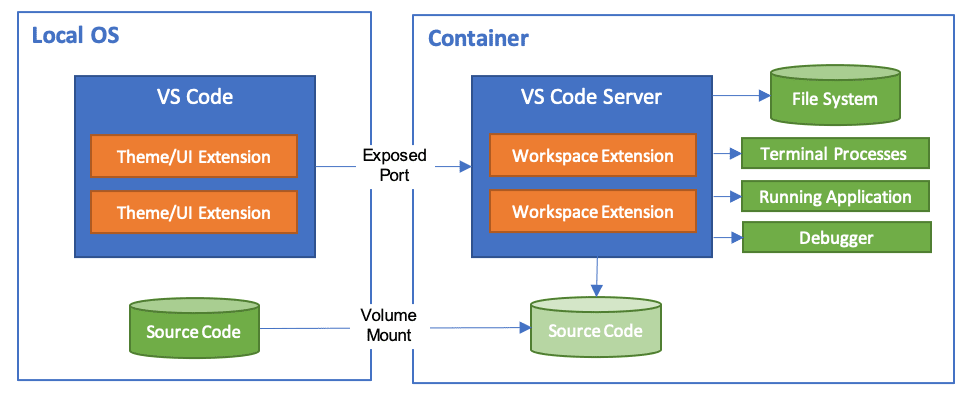
Docker containers are lightweight, portable, and self-sufficient units that package an application and its dependencies into a standardized unit. Unlike virtual machines (VMs), containers share the host OS kernel, making them faster, more efficient, and easier to manage.
Key Features of Docker Containers
- Isolation: Containers isolate applications and their dependencies from the host system and other containers.
- Portability: Run the same container across different environments—development, testing, staging, and production—without configuration issues.
- Efficiency: Containers start up in seconds and consume fewer resources than VMs.
- Scalability: Easily scale applications by running multiple instances of a container.
Why Use Docker?
Getting Started with Docker
Step 1: Install Docker
To get started, download and install Docker Desktop from the [official Docker website](https://www.docker.com/get-started). Docker Desktop provides a user-friendly interface for managing containers on your local machine.
Step 2: Pull a Docker Image
Docker uses images as blueprints for containers. You can pull a pre-built image from Docker Hub:
docker pull ubuntuStep 3: Run a Container
Create and start a container from the Ubuntu image:
docker run -it ubuntu bashThis opens an interactive shell inside the container. You can now execute commands as if you were on a fresh Ubuntu system.
Step 4: Manage Containers
List running containers:
docker psList all containers (including stopped ones):
docker ps -aStop a running container:
docker stop <container_id>Dockerfiles: Customizing Your Containers

A Dockerfile is a text document that contains all the commands a user could call on the command line to assemble an image. Here’s a simple example:
FROM ubuntu:latest
RUN apt-get update && apt-get install -y curl
CMD ["bash"]
Build an image from this Dockerfile:
docker build -t my-custom-image .Docker Compose: Orchestrating Multi-Container Applications
For applications with multiple services (e.g., a web app with a database and a cache), use Docker Compose to define and run multi-container setups.
Example docker-compose.yml:
version: '3'
services:
  web:
    image: nginx
    ports:
      - "80:80"
  db:
    image: postgres
    environment:
      POSTGRES_PASSWORD: example
Run the services:
docker-compose upBest Practices for Docker
.dockerignore: Exclude unnecessary files (e.g., logs, node_modules) to keep your image small.Common Pitfalls and How to Avoid Them

- Ignoring Image Layers: Each
RUNcommand in a Dockerfile creates a new layer. Combine commands to reduce layers.
- Hardcoding Secrets: Never hardcode sensitive data like passwords. Use Docker secrets or environment variables.
- Ignoring Volume Persistence: For data that must persist (e.g., databases), use Docker volumes or bind mounts.
The Future of Docker
Docker continues to evolve, with advancements in:
- Performance: Faster startup times and smaller images.
- Security: Enhanced scanning and vulnerability management.
- Hybrid Cloud: Seamless deployment across on-premises and cloud environments.
Conclusion
Docker containers simplify the process of building, shipping, and running applications. By leveraging Docker, teams can achieve greater efficiency, consistency, and scalability. Whether you're deploying a single service or a complex microservices architecture, Docker provides the tools and flexibility to get the job done.
Ready to dive in? Start experimenting with Docker today and transform your development workflow!
Further Reading
- [Docker Documentation](https://docs.docker.com)
- [Docker Compose Guide](https://docs.docker.com/compose)
- [Best Practices for Writing Dockerfiles](https://docs.docker.com/develop/develop-images/dockerfile-best-practices)